https://blog.theknightsofunity.com/wrong-import-settings-killing-unity-game-part-2/
There are many things that may go wrong with your game development. Your models may have too many triangles for your target platform to handle, your algorithms may be too expensive for your CPU, and also you may be using too many materials so batching won’t work efficiently. These are difficult issues, and you as a game developer should always remember to keep good balance between visuals and performance. Yet, there are some things so simple that we often forget about their existence, but these can have a serious impact on your game performance.
Last time, in Part 1, we talked about how texture import settings can kill your game performance. This time we will talk about sound import settings and why it matters.
When working with Unity many things can keep their default settings set and everything will be working just fine. Of course, defaults are not optimal in most cases, but your game should be working OK. This rule unfortunately does not apply to Audio Clip Import Settings.
Audio Clip (sound files) importing is working very similar to texture importing. Unity supports many different audio formats, but in the end it converts them all to preferred (by the engine) format. Currently, in Unity 5.2.1 this can be PCM, ADPCM, Vorbis/MP3 and HEVAG. Note that not each platform can handle all of these compression formats, and some platforms have only one format available (e.g. WebGL can work only with AAC audio clips).
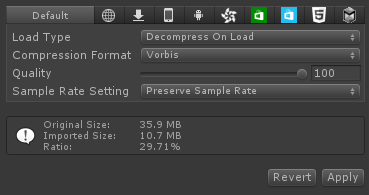
All Audio Clips are imported by default with “Decompress On Load” Load Type and “Vorbis” Compression Format.
These are default import settings.
You should be very careful with this setting, because using it on all your audio clips (Unity does it by default!) may consume large amount of your game’s memory! Do you see the info box on the screenshot? Original file size is computed to 35.9 MB and the imported size to 10.7 MB. This means that this Audio Clip will increase your game (archive) size by 10 megabytes, but playing it will require nearly 36 megabytes of RAM! This does not sound too scary if you’re building a game for PC where it is quite common to have 8 gigabytes of RAM, but mobile devices are still very limited on that manner.
Let’s get this straight. Each Load Type and Compression Format combination can be used and you’re the one who knows best which one should be chosen. There are three Load Types:
So, which one to use? It depends…