https://discussions.unity.com/t/camera-worldtoscreenpoint-bug/442095
Hi. I am currently working on a pretty simple mobile game.
Currently I am stuck on the mentioned function (WorldToScreenPoint). My issue is that, it returns some strange values on the Y axis.
What I want to do:
Basically, I need to show an icon on the edge of the screen for each off-screen monster. Since both the main player and all monsters are set on a plane, there should not be any issues.
The monster’s 2D coordinates are calculated like this : Vector2 loc = camera.WorldToScreenPoint(monster.position);
My problem is that I keep getting some strange values if the monster is to far away from the screen center.
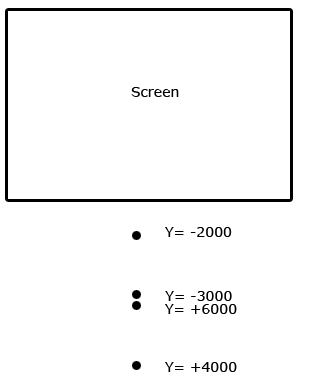
When the monster spawns, Y is about 4000. It keeps growing until around 6-7000, than it jumps to -3000, at wich point the values are correct until it gets on the screen. If I move away far enough from the monster, the same thing happens again.
I also attached an image in hope it better explains my issue.
Any help is greatly appreciated.
Thanks,
Cristi

Is it necessary to find the screen coordinates when the monster is off the screen? Seems like you just need to know if the monster is on the screen or not.
You can avoid the problem stated above by comparing strictly world coordinates. So instead of converting the monsters world coordinates to screen coordinates, you can convert the edge of the screen to world coordinates and compare those.
The camera also has a function that computes viewport to world coordinates (the viewport vector has x and y between 0 and 1 and I think z is distance from the camera). So maybe you can get the location of the icon by checking
pseudo code (definitely wont compile):

if the monster.y  < camera.viewportToWorld(0,0,(distance from camera to ground plane)) then
{ //the monster is below the screen draw the icon on that edge of the screen
    icon.y = viewportToWorld(0,0,distance).y;
}
else if the monster.y  > camara.viewportToWorld(1,0,(distance from camera to ground plane)) then
{ // the monster is above the screen then draw the icon on the top edge.
    icon.y = viewportToWorld(1,0,distance).y;
}
else
{
 the icon is right on the monster.
}

Do the same for X;

then rotate the icon to point at the monster using world coordinates. There is a vector3 function that does this.